

In a recent guest post at Women In the Black, I referred to the TED talk where ad exec Rory Sutherland suggested that – the simplest way to help people save is with a red button on the living room wall. It’s all about the simplicity of the interface.
So, in keeping to this thinking, we’ve built Safely Spend – a ridiculously simple approach to budgeting.

Why Safely Spend?
Budgeting is hard, and often individuals get too wound up abut the big daunting number in the future (output), rather what could be done week-to-week (input).
We wanted a really simple way for people to understand budgeting for today and tomorrow – without having to work it all out. So we linked it directly to the spending you already do!
We automatically calculate your regular spending habits based on history.
Safely Spend helps to answer money management questions like:
– What is my discretionary spend limit this week?
– What did I spend on discretionary items in the last few weeks?
– Where are some areas I can cut this down further?
And changes colour when you go over.
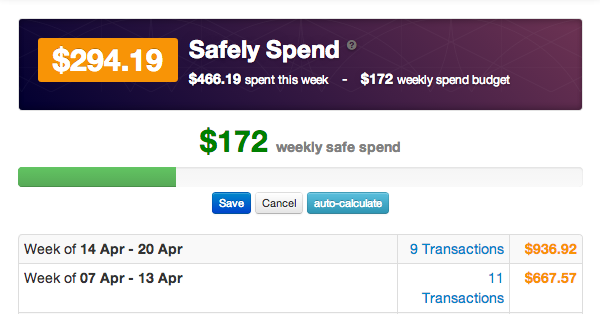
How it works
We determine your discretionary spending – this is your total spending minus your bills and any extra-ordinary one off spends – and we track that during the week against your actual spending.
So you know instantly how much you can spend at the moment and for the rest of the week – without breaking the budget! Simple.
And if you do, we’ll send you an email to let you know (see following picture).
To take best advantage of Safely Spend, tag any bills or one off spends that you have – so they are excluded from ‘Safely Spend’.
You can do this for relevant transactions by:
– Click on a transaction so the details appear on the right
– Clicking “Create Bill” or “One Off Spend”
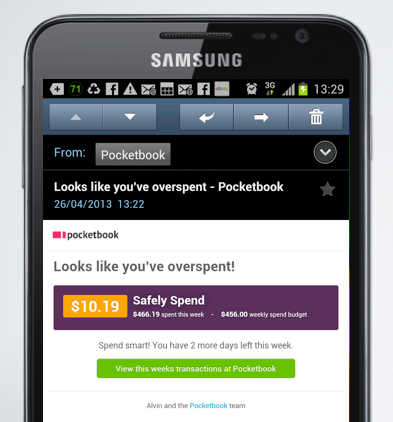
You can try out Safely Spend today in the Budgets tab in your Pocketbook.
Bosco

What are your plans to budget for items that are not ‘bills’ in the regular sense. For example, we should be able to budget for ‘petrol’ but might need to buy it at a different supplier every week. To set up budget by supplier is a little awkward for this, and groceries and other items.
There is also a different issue with things like insurance, where there might be 3 types of insurance to budget for (health, car, home) but if these all come from the same supplier Pocketbook will have trouble differentiating the different types of bills.
Hi Marlene, this is for limiting budgets outside of bills?
It’s a high level sum today, but will relate to categories moving forward.
On the insurance piece, we’ll be developing better smarts for recognising different types from the same supplier.
hope that makes sense
Hi, how do you determe what the ‘safely spend’ limit is? I can’t find anything about this on the website.
Cheers
Peter
It’s discretionary spend beyond your regular bills – based on history – see here: https://getpocketbook.com/features/safely-spend
Hi, is it possible to set a budget for a category, and then specify the required time period for that budget.
For example I may want to set a target budget of $120 on groceries per week but may want to budget $600 per year for car insurance.
By setting different time periods the software could determine if the budgets were being met eg groceries per week and whether adequate money would be saved for larger budgeted annual items. Eg car insurance etc.
Is this kind of budgeting function currently possible or planned for the future? Sorry for the long comment.
Cheers
Benton
Hi, this is the next iteration of Safely Spend – you’ll be able to pin down by category soon.
Hi Bosco,
I just wanted to say, very nice job on Pocketbook. I love the overall simplicity of the application thus far, and that a straight forward approach to financial management is driving the way features are implemented.
It’s great to hear that we’ll be able to pin down categories under safely spend, this will help make this an extremely powerful feature.
A few quick questions:
1. Is the next iteration of category driven Safely Spend going to be underpinned by planned budgets per category, or only historical spending as is the case right now?
Hopefully it will be driven by planned budgets as this is a key feature IMO in regards to using software to help guide users towards smarter spending. We all have goals of what we would like to be spending, as opposed to what we are currently spending. As the figure right now is historical, it is very useful for helping us keep our heads above water, but no so much at helping us really get ahead.
Additionally, as it is currently historical, this means that the magic safely spend figure won’t be truly accurate until we have a years worth of data in there.
My final point on this, is it would also be great to be able to see where we are at per category at any given time.
2. Do you have a plan for savings goals in pocketbook?
I would love to be able to set goals for such things as saving for a car, paying off my credit card etc. Obviously we can do that by calculating our goals outside of pocketbook and then registering a bill once we have made a transaction, however it is a bit clunky to do it that way.
Assuming you do add this, it could also be tied into the awesome safely spend figure.
3. This is more of a tweak than anything, though I am wondering if you have plans to allow changing dates for bills?
If a bill was supposed to fall on the 4th for example, but the 4th was a Saturday it wouldn’t have come out of my account until the 6th. As such the bill would be listed as the 6th in the system, when in reality it should be the 4th.
Anyway, that’s enough for now. I’m absolutely loving it!
Thanks for the kind works Michael. to answer you questions.
1. The ability to limit by category based on history is the premise of Safely Spend. So to do that by category is the next potential iteration. – the aggregate number today is historical, but you can move the dial on it to set a desired limit.
2. Savings goals will link to Safely Spend based on your moving of the dial back. And we’ll attempt to work that to link to future goals.
3. Flexibility with bills will come in the future as well. I don’t think we’ll take a position on changing the dates. Perhaps we’ll move things to weekdays as the algorithm gets smarter, but the autodetect should get it from our perspective.
Thanks bosco,
That all makes sense.
In an ideal world I would prefer to have the ability to set actual forecast based budgets (per category), rather than having them based on historical figures. I don’t really see the value of budgets based on historical figures. How would someone who has a bad track record know that they are planning correctly for the future?
Moving the slider / dial to me doesn’t offer a real way to adjust my budget either as it is arbitrary. What does it relate to? Without knowing the algorithm, I have no way of knowing whether moving down is financially useful (ie not linked to goals etc), and whether moving it up is even viable.
With that said, you would still want the safely spend figure, as it is hugely valuable once you have your spendings on track. I don’t see any reason why they couldn’t co-exist.
On a slightly different topic, I am still doing my actual projections in excel, so I can plan through to the end of the year based on cash position, income, planned expenses etc for each month. This is hugely helpful for long term cash management. It would be amazing if pocketbook had a feature to handle this too!
My preferences aside, all of the new tools you are putting out are great. Just saw the mobile app. I might even change from android to ios so I can use it 🙂
Thanks again for pocketbook. It’s the best platform by far, having now trialled xero personal for over a year, as well as a bunch of desktop apps.
Thanks bosco,
That all makes sense.
In an ideal world I would prefer to have the ability to set actual forecast based budgets (per category), rather than having them based on historical figures. I don’t really see the value of budgets based on historical figures. How would someone who has a bad track record know that they are planning correctly for the future?
Moving the slider / dial to me doesn’t offer a real way to adjust my budget either as it is arbitrary. What does it relate to? Without knowing the algorithm, I have no way of knowing whether moving down is financially useful (ie not linked to goals etc), and whether moving it up is even viable.
With that said, you would still want the safely spend figure, as it is hugely valuable once you have your spendings on track. I don’t see any reason why they couldn’t co-exist.
On a slightly different topic, I am still doing my actual projections in excel, so I can plan through to the end of the year based on cash position, income, planned expenses etc for each month. This is hugely helpful for long term cash management. It would be amazing if pocketbook had a feature to handle this too!
My preferences aside, all of the new tools you are putting out are great. Just saw the mobile app. I might even change from android to ios so I can use it 🙂
Thanks again for pocketbook. It’s the best platform by far, having now trialled xero personal for over a year, as well as a bunch of other desktop apps.
Are budgets for individual categories available or coming soon?
Hi Cole, we are currently working on that. It should be soon!