

Many of you have overwhelmingly asked for more flexibility with categorisation.
You’ve asked for features like bulk categorisation, as well as renaming and deleting the categories in Pocketbook.
We’ve listened!
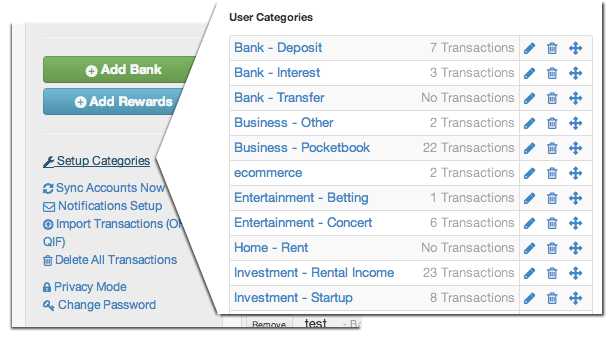
Here are a few of these features you’ve asked for. First for your custom categories.
We now let you:
– Edit – Rename your category name
– Delete – Remove your category
– Re-categorise – Bulk move your transactions to another category
Try it now!
Bosco

Hi Bosco,
nice features there!
But since there is always room for improvement… it would be great to add an extra layer of subcategories.
I have an “Hobbies” category with a “DIY” subcategory, I would like to create another subcategory for each DIY project in order to see the total cost of DIY as well as the cost of each single project.
Examples:
Hobbies – DIY – Boat
Hobbies – DIY – Trailer
and so on…
Also the ability to delete some default categories would be welcome. Example: Kids (I don’t have kids!)
Great job anyway.
s.
Just discovered this great application – hooray for you guys finally putting Australia on the map with online accounting! I know you re in early days yet, but are you likely to add an export (to csv, ofx, qif etc) feature so that these beautifully categorized transactions can be imported into our accounting packages for doing our BAS and general accounting?
Cheers!
It would be great if we can edit the default categories as well.
Agreed Anze, it would be great to be able to archive or hide default categories.
Michael, this will be in the future.
Hi Sildor – thanks for the suggestion. We’ll look into it. Perhaps use Hobbies – Boat, and Hobbies – Trailer in the meantime.
Andrea – thanks for the kinds words. We’ll add export in the future. Try copy and pasting into excel for now.
Anze – thanks – this will be introduced in the future!
Firstly, nice job; I am impressed. I can understand the fine line between power and ease of use.
Having spent a few hours setting things up post using Quicken for many years, my general feedback would be:
Refresh button as page doesn’t auto refresh (which is fine).
Sub categories, and ability to delete / modify default categories.
Ability to “save” defined views (to save always repeating manually), and then be able to print / export these.
Again nice work guys, and I’ll recommend to people I know, as this is a great time saver.
Thanks for the kind comments Malcolm. We’ll look at your suggestions – the saved view is especially interesting – what are you specifically thinking?
Here’s a silly question ..
I have weekly payments going for Rent and quarterly towards utilities as recurring bank transfers . Is there a way to capture my Rent transactions in “Rent” category. Currently its being captured in the default category of “Transferring Money”?
Sure. You can change the category for a few of them and then it should automatically update.
Has this feature been pulled?
I do not have the icons to the right of ‘X Transactions’ and would love to be able to edit.
This feature only exists for categories that are custom – ie you’ve made them yourself. You can’t edit and delete default categories yet.
Thanks Bosco, worked it out!!
I link on that categories set up page to set up new categories would be brilliant. At the moment I can only create a new category from the transactions area.
Regards,
Belinda
Hi Belinda, thanks for the suggestion. We’ll have a think
Hi, Is there a way of deleting any transactions?
Yes, you can delete either on the website or the mobile app via the transaction details page
Hello,
We use pocket book every day and it has really helped us but we want to remove the default User Categories and just have the custom ones as this is a lot easier for us.
Do you have a feature for this as i can not find it.
Thank you